Week 10: Optimisation
- Stevie Tewfik
- May 6
- 3 min read

I have found that my torches are extremely demanding on my VRAM, so I thought that would be the best place to start in terms of optimising my scene. Currently, whilst the fire looked decent (a bit too exposed and "big") it was way too GPU intensive, so I had to find a way to make it more manageable.
That's when I was scrolling through Youtube, and came across a video about the evolution of videogame effects, where there was a brief look at fire. Early early games simply used a PNG of a fire, but as hardware began to evolve, animations began creeping their way into games.
A common tactic was called "flipbook animation", which is pretty self-explanatory, and the best thing about this method, is that there was a node for it in Unreal! I was able to find a tutorial to help me insert this function, as there are certain nodes that are required for a successful compiling of nodes.

The "flipbook" works by cycling through different images, but all from within 1 texture sample. I was able to find a series of fire images on the Unity website, and as long as the image you use is evenly divided into a certain number of "rows" and "columns" of images, the flipbook is able to cycle through these, by dividing the whole image into different "frames" at a speed which is determined by what you plug into the "animation phase" slot.
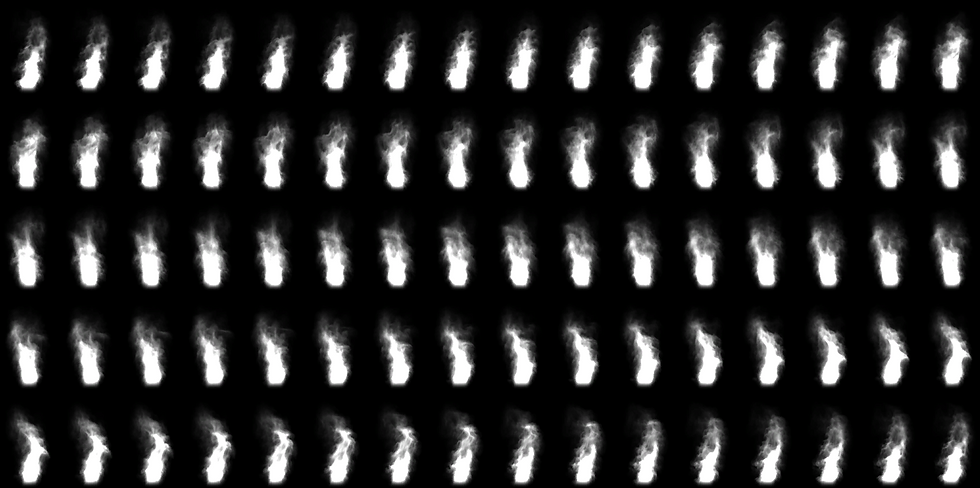
I plugged this result into the opacity mask, which created a perfect mask (as black is rendered as transparent) for the flames. Then all that was left was to add a base colour of yellow (with a lerp node to use the whitest parts of the flame as a mask) and an emissive colour of red, making it a light source.

Whilst I'm very happy with how this looked, the material was emissive, but not to a degree high enough that there would be light projected to the nearby surroundings. So, I had to add a light source within the flame to cast light instead. I'm going to focus solely on lighting next week, though I had to do this this week as I couldn't take my mind off of the fact the torches didn't behave like they would in real life.
This is what the torches look like with, and without the light source. It is fully adjustable as it is a point light, including colour, temperature and brightness. I really like the shadows that it casts as a result of my torch mesh geometry.

Another thing that I wanted to do was use "splines". These were something I had kept seeing come up online, often used to make paths, fences, and long lines of repeating assets. I had to find a way to integrate these into my level, and currently all of my vines were very uniform, only existing precisely on the wooden beams of my walls, all pointing down without any "climbing" around.
After searching for a long time, I managed to find a video on Youtube teaching me how to create this effect. It consisted of enabling the PCG plugin (which is included with Unreal by default), and creating a blueprint and graph to control it by.

Each of these nodes, in particular the "density filter" nodes allows you to change how many instances of meshes are distributed per point on a curve, as splines are basically Bezier curves from which you can manipulate and spawn instanced static meshes from.
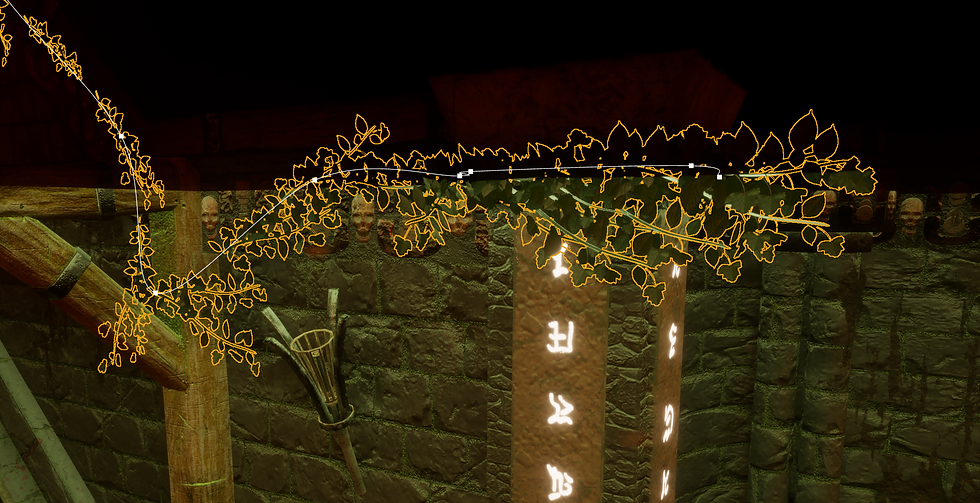
As you can see above, there is a spline in the scene, with dots scattered within it, you are able to completely move these at any time, and the vines will react and spawn differently depending on some factors like; location, rotation, and whether it is intersecting with a mesh.

These are pretty non-intensive in terms of performance, and I'm so happy with how much milage I've been able to get out of them, considering all I used was my vine mesh I made last week!
My boss room was still looking quite bland, so I dotted some torches around the pillars and added some "vine splines" twisting and turning through different objects. Additionally, the bricks you see on the floor are a material instanced version of my smaller rubble bricks. The brilliant thing about foliage brushes is that you can change the scale of the mesh instances you use, meaning I didn't have to model a whole new set of rubble just for this room.

Bibliography/ External Reading:
_______________
Royal Skies. “UE5: Sprite-Sheets (in 60 SECONDS!).” YouTube, 11 Aug. 2024, www.youtube.com/watch?v=c-bs1HFUobU.
Unity. “Free VFX Image Sequences and Flipbooks.” Unity, 2025, unity.com/blog/engine-platform/free-vfx-image-sequences-flipbooks.
FLIPSIDE 3D. “Get Tangled with PCG : 3 Methods for Vine Farming.” YouTube, 8 Apr. 2023, www.youtube.com/watch?v=Xd2_D5_N4rc.


Comments