Week 11: Lighting
- Stevie Tewfik
- May 6
- 4 min read

As I have mentioned in some previous weeks, I have used emission in quite a few of my assets, and I wanted to take a moment to explain how I achieved this effect.

As you can see on my weapon chest, the diablo symbol and skulls are emitting a reddish glow. This is a feature that you can enable in Substance Painter, under the texture set settings.
Just create a new layer, add a black mask and paint layer (whilst setting the "emissive colour" to your choosing) and you can paint emission wherever you want.

Additionally, there are extra controls which allow you to see how the emission will look at different strengths.

After having stared at this Unreal scene for so long, it was hard to deny that the lighting wasn't looking as vibrant and varied as it could be. It was still too bright, as my scene was almsot getting all of its light from the large point lights above each of my room.

Since week 2, I knew these were placeholders, but now it was time to replace them, so at long last it was time for spotlights and volumetric lighting...
I started by adding a large, bright spotlight into my main room, shining into it from outside the "window".

This ended up creating a cool-looking shine on the puddle decal I had placed down, but it still looked too artificial, and there was no "proof" that the light was shining through the window.

As you can see, only the SSS of the vine was really picking up that the light existed, it was still just a black void outside of the room. There was a way to fix this however, using a volume called "ExponentialHeightFog".

This casts a haze over the scene, giving the level's atmosphere a thickness, as if it were incredibly dusty/ musty, which was the desired look, however my spotlight still didn't look correct, as no "god rays" were being cast from it, and I couldn't figure out why.

The point lights for the torch fire looked great, but as you can see on the left, there were still no rays! So, I went down to the GA, once again seeking help from William Pryn, and surprise surprise he fixed it in a few seconds. All I had to do was turn on "cast volumetric shadow" and then increase the "volumetric scattering intensity" until I had a believable effect. Now, you can clearly see that the window grate is obscuring some of the light, creating this stippled effect, and not just 1 block of light.

As I began to add in more lights into my scene, I realised that some of my materials were allowing light to leak through them, resulting in some of the normals being lit very randomly. This is a shot from within my cave, and as you can see there is a weird spill of light.

This can sometimes occur when an object (like my rock plane here) is too geometrically thin. To counteract this, you can add "light blocking volumes" in the form of large, black cubes between the light source and your affected object that obscure the light, literally blocking it from reaching your intended mesh.

As you can see (or rather can't see) from the image below, no light is now leaking through as I placed a huge block outside of the "cliff room". I ended up having to add 4 of these around my level, just to make sure no extra light was flooding through.

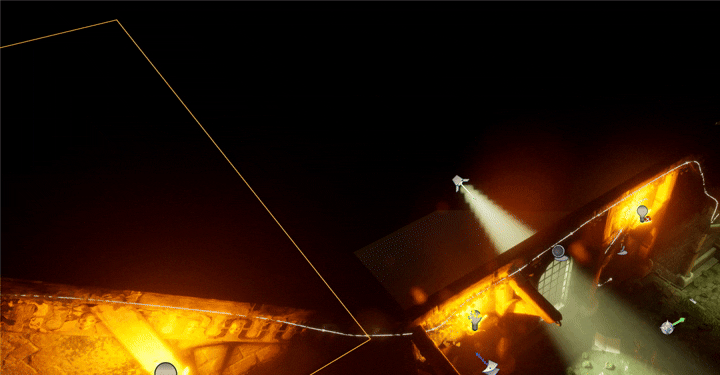
In addition to these, I noticed that the spotlights outside of the level area were visible when playing through my level (yes it's fully playable as I sorted all of the collisions for all of my objects. Of course, I didn't want the source of the light being visible outside of the "world" so i used a similar tactic of placing a jet black plane over the top of them.
As you can see below, this worked absolutely perfectly, resulting in a perfectly isolated scene.
That's when I suddenly realised, one of my assets was also supposed to be emitting light, but currently wasn't, my candles!
I had to find a way to create a gentle candle light effect, however, it proved very difficult to find a flip book animation for a candle, so I resulted back to Niagara. I managed to find (within a basic fountain simulation) that you are able to change more of the basic properties of the default sprite than I had originally anticipated.
Candles have a very small light (of course) but it's quite a long flame, as opposed to the "balls" that a default fountain emits. I managed to achieve this effect, though it looked more like a thick, magma liquid as opposed to candles.

I found that bringing the lifetime of the sprites down, decreasing their velocity, and changing their scale properties gave me a much more believable simulation.

These looked a lot better, and actually cast light, as for some reason the default fountain Niagara sprite emits light, in a perfect orange glow of a fire, with a more concentrated, white centre.
Bibliography/ External Reading:
_______________
Arc, Branden . “Volumetric Lighting & God Rays in Unreal Engine 5.” Www.youtube.com, 12 Apr. 2022, www.youtube.com/watch?v=cOGW5EJ7scA.


Comments