Week 4: Reading week - Trim Sheet Exploration
- Stevie Tewfik
- May 3
- 4 min read

Updated: May 6
Considering I am more than up to date with this project at the moment, I thought I'd use my time during reading week to start experimenting and exploring trim sheets, as they fascinate me on how optmisied studios can make game levels.
As the murals and teaching resources haven't been released for week 5, I decided to look to the internet. Recently, I've had videos from a Youtuber by the name of Abe Leal 3D. He made a 3-part series on how to model, organise, texture, setup, sculpt and bake trim sheets for use in Unreal Engine games. So, naturally, I followed along creating my own version for my level.
The thing I like most about trim sheets is that you can put as much detail as you could possibly want to, without having to worry about poly count or UV's, as all the details are baked onto a plane, from which I can export the textures from and allocate UV space to on my modular pieces.

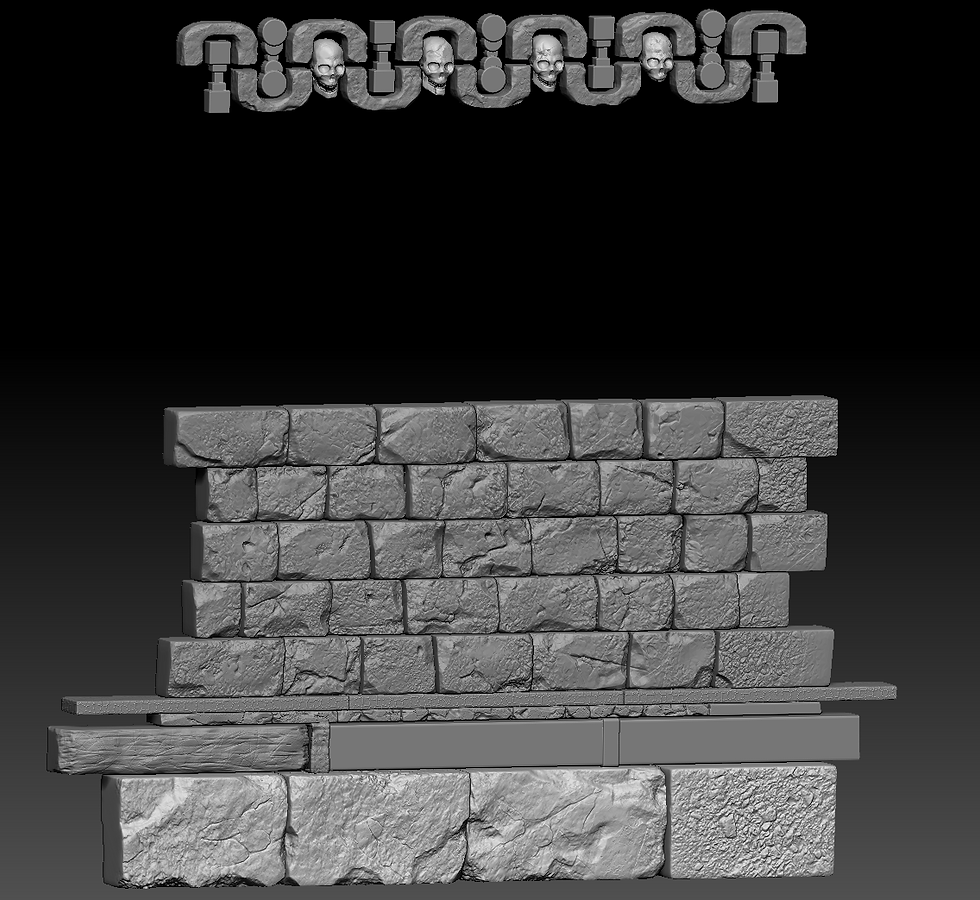
Trim sheets also work like hero assets, as I made a low poly and a high poly in ZBrush. Above, you can see my low poly, with all of my different sections laid out in repeating sections. For my high poly model, I only had to model 5 rows of the large bricks, as I could just duplicate them and change the order for the next 5 rows. A similar technique applied for the wooden beams and metal clasps, just some slight scaling and rotating could vary the pattern enough to break the obvious repetition.
In Maya, I allotted different materials with different colours to the sections of the trim that I wanted to add different textures to. This process is called baking in ID Masks, and allowed me to use said ID Masks as actual black masks in Painter, giving me a high level of accuracy and control for what sections of the trim receive different textures.

I spent quite a while texturing the trim, especially considering how much it is going to be used throughout my level. I'm very happy with how its turned out, and below you can see how it looks on some basic planes without any protruding geometry. I rendered this out in Marmoset Toolbag, and you can see that it tiles well, without repetition seeming too obvious.

Then, naturally, I had to see how it looked in-engine, and how it looks on my wall segment. Again, I created a simple material and assigned each of my exported maps; the albedo, normal and ORM using the "Unreal Packed" export template in Painter.

Whilst, generally, it looks lighter in Unreal, I still think the material values read well, especially on my wall piece, however this discovery made me think more about my corner and pillar pieces. I realised I needed to re-model my corner pieces as classic dungeons have more circular walls compared to lots of jagged edges.

Upon creating a "corner-pillar" design (with the heights of the sections of the pillar matching up to the trim sheet) I brought it into Unreal. Seeing that it tiled well in engine, I deemed it time to set this material for all of my modular pieces in my main game file.

I then found that I wanted to take a part-hero asset workflow to texturing my pillar element, considering that the geometry is quite complex. I created a high poly as well in ZBrush (with the bricks being comprised of an alpha I found online) which I baked back onto my low poly model, before taking it into Painter. I now realise there was no point etching details into the wood, as my trim already had its details baked in.

As you can see, I didn't have to texture the wood and golden trims of the asset, as my trim sheet already had these elements. So, I simply applied another material to those sections on the low poly and, in Maya, arranged the UV's to match with the related sections of my trim material. That then allowed me to just assign my trim material inside Unreal, and everything matched up.

This is what my scene now looks like as of 15th February. I am focusing on this room in particular as one of the main POIs, along with the boss room, however the boss room will be made up of new, larger assets and a new tiling material.
I am very happy with how quickly I have managed to envision my ideas, despite having so many different aspects of the project that I could we working on at once. Nevertheless, I will hopefully continue moving forward at the pace I am now, and be able to spend a lot of time on my hero asset, props and set-dressing in the later weeks.
Bibliography/ External Reading:
_______________
Abe Leal 3D. “Trim Sheets for Games - Modelling and Organization.” YouTube, 22 Oct. 2025, www.youtube.com/watch?v=CsKGqD8GVNY.
Pinterest. “Stone Drawing Texture.” Pinterest, 16 Nov. 2019, jp.pinterest.com/pin/802203752362448210/.


Comments